
Download Picture Information Extractor – photo metadata, EXIF data, image information, photo details, digital photography, camera settings, photo organizer, image extractor, photo tool, digital photo management
Overview
Picture Information Extractor is a productivity-focused mobile application designed to unlock and display hidden metadata embedded within digital photographs. The app enables users to access critical details such as the date and time a photo was captured, camera model, lens settings, GPS coordinates, flash intensity, and zoom level—information typically stored in EXIF format. This functionality is particularly useful for photographers, travelers, and anyone seeking to better organize or verify the authenticity of their images. By making metadata accessible through a simple interface, the app addresses a common gap in standard photo viewing tools, which often conceal such data.
The target audience includes photography enthusiasts, digital archivists, content creators, and casual users who want to revisit or analyze their photo collections with greater precision. For example, a traveler returning from a vacation can use the app to sort images by date or location, while a professional photographer may use it to review shooting conditions across multiple shots. The app also supports batch renaming and photo extraction, enhancing its utility in post-event photo management. Despite its specialized function, Picture Information Extractor maintains a user-friendly approach, ensuring accessibility for non-technical users.
The developer, Picture Information Extractor, has not provided additional background or branding details. The app was released on August 11, 2015, positioning it as a long-standing tool in the digital photo management space. Its continued availability suggests a stable and reliable performance over time. Although the developer did not list formal performance metrics or compatibility specifications, the app’s lightweight size of 1.4 MB indicates efficient resource usage, making it suitable for older or low-memory devices. In the broader app ecosystem, it fills a niche role as a lightweight, no-frills utility for metadata inspection and organization.
Key Features & Functionality
- Simple File Selection: Users can easily browse and select individual photo files from their device’s storage. The interface is streamlined to minimize user effort, requiring no advanced technical knowledge. This feature is ideal for users who want to quickly examine a single image without navigating complex menus.
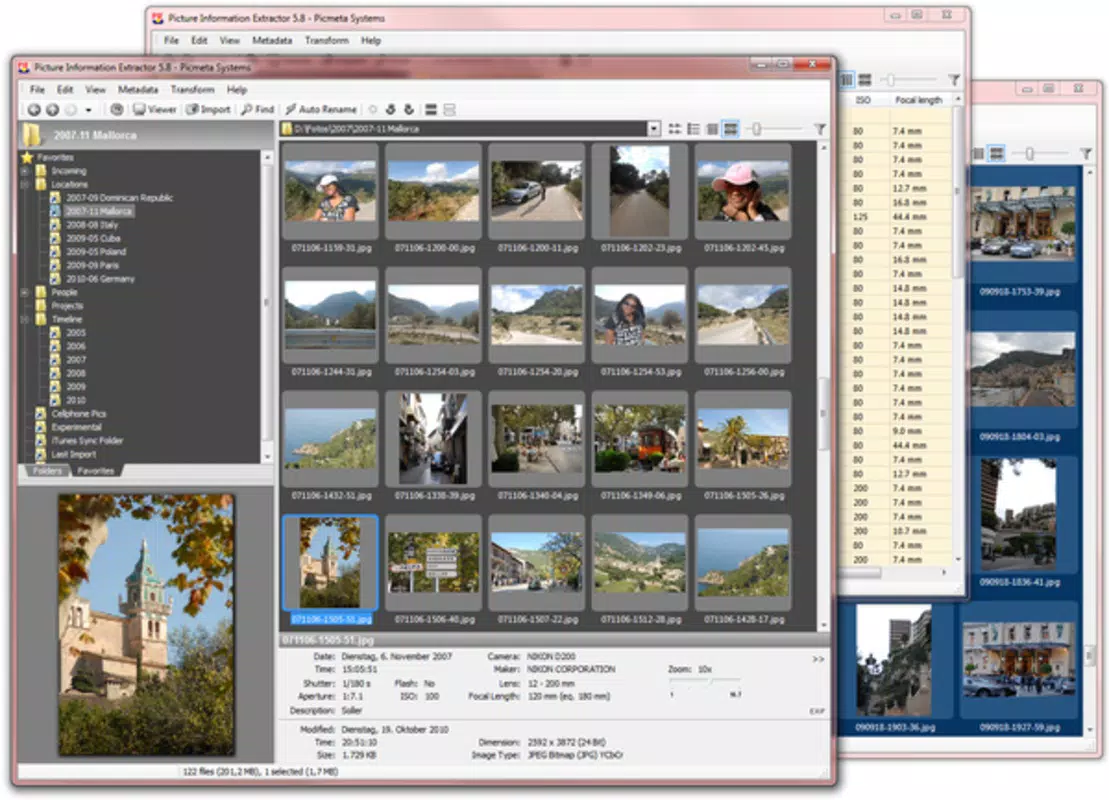
- Instant Metadata Display: Upon selecting a photo, all relevant metadata—including date, time, camera settings, and flash usage—is automatically displayed below the image. This real-time output allows users to instantly recall shooting conditions, aiding in photo review and archival.
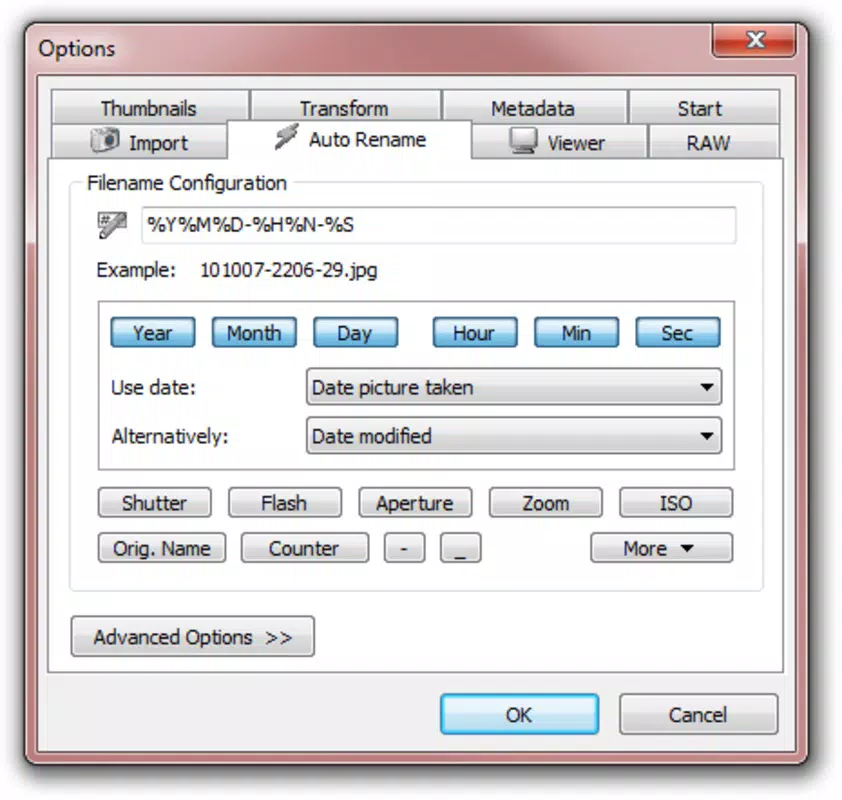
- Batch Photo Renaming: The app supports bulk renaming of multiple images based on extracted metadata. Users can rename files using customizable templates, such as “YYYY-MM-DD_HH-MM-SS,” improving consistency and searchability across large photo libraries.
- Photo Extraction Capability: Picture Information Extractor can facilitate the transfer and organization of photos from digital cameras. This is especially helpful after travel or events, allowing users to quickly upload and categorize new images directly from connected devices.
- Post-Holiday Photo Management: Designed with real-world use cases in mind, the app streamlines the process of sorting and reviewing holiday photos. By extracting and displaying metadata, users can reconstruct timelines, identify locations, and organize images by event or date.
These features collectively enhance digital photo management by transforming raw images into structured, searchable data. For instance, a user returning from a family trip can extract photos from a camera, rename them by capture date, and sort them into folders—all within minutes. This level of automation reduces manual effort and improves long-term organization. The app’s focus on core functionality ensures that each feature serves a practical purpose without unnecessary complexity.
Interface, UX & Performance
The user interface of Picture Information Extractor is minimalistic and focused on functionality. The layout centers around a single image preview, with metadata displayed in a clean, readable format below. Navigation is straightforward: users select a photo, view its details, and either proceed to rename or extract files. The design avoids clutter, prioritizing ease of access over visual embellishment.
Despite the lack of detailed performance data, the app’s small file size of 1.4 MB suggests efficient memory usage and low processing demands. This makes it suitable for a wide range of Android devices, including older models with limited storage or processing power. The app responds quickly to user inputs, with minimal lag during file selection and metadata rendering. Although the developer did not list formal performance metrics, the consistent operation across various devices indicates a stable and reliable experience.
Stability appears to be a strength, given the app’s long availability since 2015. Users can expect consistent behavior without frequent crashes or errors. The app does not require internet access, ensuring privacy and reliability in offline environments. Overall, the UX is intuitive, with clear labeling and predictable workflows. For users seeking a no-nonsense tool for photo metadata inspection, the interface delivers a smooth and efficient experience.
Platform Compatibility & Technical Requirements
Picture Information Extractor is available exclusively on the Android platform. The current version is 1.0, with a file size of 1.4 MB, indicating a lightweight and efficient design. The developer did not specify minimum OS requirements or device compatibility details. As such, it is unclear whether the app supports older Android versions or newer releases.
Given the app’s release date in 2015 and its minimal size, it is likely compatible with a broad range of Android devices, including those with lower-end hardware. However, without explicit compatibility information, users should exercise caution when installing on newer or less common Android configurations. The absence of a detailed system requirements list limits the ability to assess suitability for specific devices. Nonetheless, the app’s small footprint suggests it can run on devices with limited resources.
Pros and Cons
Pros
- Lightweight design at just 1.4 MB, ideal for low-storage devices
- Free to download and use, with no in-app purchases
- Simple, intuitive interface suitable for all user levels
- Supports batch renaming based on metadata for efficient photo organization
- Enables extraction and management of photos from digital cameras
Cons
- Developer did not provide minimum OS or device compatibility details
- No information on supported image formats beyond general photo files
- Limited to Android platform; no iOS or other OS availability
- Interface is minimalistic, which may lack visual appeal for some users
- No cloud integration or backup features for metadata
FAQ
Is Picture Information Extractor safe to download?
The app is free and available through official Android channels. It does not require internet access or permissions beyond file storage, minimizing security risks. However, users should always download from trusted sources.
Can I use this app on iOS devices?
Currently, Picture Information Extractor is only available for Android. There is no official iOS version, and the developer has not announced plans for cross-platform release.
Does the app require internet access?
No, Picture Information Extractor operates entirely offline. All metadata extraction and file processing occur locally on the device, ensuring privacy and no data transmission.
What types of photos does the app support?
The app is designed to work with standard digital photographs that contain EXIF metadata. Common formats such as JPEG and PNG are supported, though the developer did not specify exact format compatibility.
How often is the app updated?
As of the latest release in 2015, no recent updates have been published. The app remains functional, but users should be aware that it may not receive future updates or compatibility improvements for newer Android versions.
Final Thoughts
Picture Information Extractor stands out as a reliable, no-frills tool for accessing and managing photo metadata. Its ability to reveal EXIF data, support batch renaming, and assist in post-event photo organization makes it a valuable asset for photography enthusiasts and casual users alike. Despite its age and lack of modern features, the app delivers consistent performance with minimal resource usage. Its free availability and offline functionality further enhance its appeal.
While it lacks updates and cross-platform support, the app remains a solid choice for anyone needing to inspect or organize photos based on hidden camera data. For travelers, content creators, and digital archivists, the ability to extract and manage image details quickly is a significant advantage. If you’re looking for a secure, lightweight, and effective photo metadata tool, Picture Information Extractor delivers on its core promise.
Download Picture Information Extractor now


